


Featured Articles
Frequently Asked Questions
Printshop Plugin
Welcome to Printshop Knowledge Base!
We’re thrilled that you’ve chosen our plugin to enhance your Knowledge Base. We’re here to assist you in making your Knowledge Base exceptional. If you need any help or have questions, just let us know!
Create Articles Just Like You Create Posts
Add instructional videos or product demos. Example of embedded video:
Main Features
Acumatica Printshop is an industry-specific solution designed for businesses in the print, promotional products, and decorated apparel industries. It extends the core functionalities of Acumatica ERP with features tailored to the unique needs of these businesses. Here are some of the main features of Acumatica Printshop:
Production Management
- Job Management: Manage all aspects of print production jobs, including job statuses, inter-department activities, and sales and purchasing statuses.
- Art Approval Workflow: Streamline the art approval process with automated workflows and notifications.
- Job Card Setup: Capture and track detailed job information, such as customer details, product specifications, and production notes.
Sales and Order Management
- Sales Order Automation: Automate sales order processing, including drop shipping and order fulfillment.
- Customer Owned Inventory: Manage inventory owned by customers, allowing for consignment and pre-ordering scenarios.
- Multi-Line Shipping: Enable shipping a single sales order line to multiple locations, optimizing shipping costs and efficiency.
Inventory Management
- Real-time Inventory Tracking: Track inventory levels in real-time, including raw materials, finished goods, and customer-owned inventory.
- Inventory Optimization: Tools to help optimize inventory levels, minimize stockouts, and reduce carrying costs.
- Warehouse Management: Support for warehouse management processes, including picking, packing, and shipping.
Reporting and Analytics
- Print-Specific Reports: Generate reports tailored to the print industry, such as job costing reports, production status reports, and customer activity reports.
- Generic Inquiries and Dashboards: Create custom inquiries and dashboards to visualize key performance indicators (KPIs) and gain insights into your business.
- Integration with Third-Party Systems: Integrate with other systems, such as e-commerce platforms, shipping providers, and accounting software.
Other Key Features
- Customization: Acumatica Printshop is highly customizable, allowing you to tailor the system to your specific business processes and workflows.
- Cloud-Based: Access your data and manage your business from anywhere with an internet connection.
- Scalability: Acumatica Printshop can grow with your business, supporting an unlimited number of users and transactions.
Need Help or Looking for a Feature?
Please don’t hesitate to contact us here.
We’re always eager to help and are open to suggestions for new features.
How to publish Printshop plugin on Acumatica Instance?
In this video, I walk you through the initial setup of the PrintShop plugin within your Acumatica instance. It’s essential to have the right access rights and permissions to deploy the custom library, so please check with your implementation team if you’re unsure.
I also cover how to import the PrintShop package and publish it correctly. After publishing, you’ll find a new workspace dedicated to PrintShop, which is your hub for all related activities. Please make sure to stay tuned for the next video on security rights and permissions.
Video Tips:
- Turn on Closed Captions
- Adjust the speed of video and audio
- Watch in full screen and finally you can like the video or leave your comments
Need Help or Looking for a Feature?
Please don’t hesitate to contact us here.
We’re always eager to help and are open to suggestions for new features.
Activate Printshop Licensing
In this video, I walk you through the initial setup of the PrintShop plugin within your Acumatica instance. It’s essential to have the right access rights and permissions to deploy the custom library, so please check with your implementation team if you’re unsure.
I also cover how to import the PrintShop package and publish it correctly. After publishing, you’ll find a new workspace dedicated to PrintShop, which is your hub for all related activities. Please make sure to stay tuned for the next video on security rights and permissions.
Video Tips:
- Turn on Closed Captions
- Adjust the speed of video and audio
- Watch in full screen and finally you can like the video or leave your comments
Need Help or Looking for a Feature?
Please don’t hesitate to contact us here.
We’re always eager to help and are open to suggestions for new features.
Knowing About Printshop Job Types
In this video, I’m diving into the powerful configuration options within the Acumatica Print Shop module. I’ll cover the predefined job types and the new custom job type feature introduced in Print Shop 2.0, which allows for a wide range of personalized products.
I encourage you to think about how these configurations can enhance your offerings and streamline the sales order process. Please take a moment to consider how you might implement these options in your own work.
Video Tips:
- Turn on Closed Captions
- Adjust the speed of video and audio
- Watch in full screen and finally you can like the video or leave your comments
Need Help or Looking for a Feature?
Please don’t hesitate to contact us here.
We’re always eager to help and are open to suggestions for new features.
In this video, I walk you through the essential settings of PrintShop and how to customize them for your needs. We cover features like enabling multiple job cards per line item and the importance of job sequencing to avoid production errors. I also highlight how to manage job dates and pricing analysis effectively. Please make sure to enable the discussed features in your PrintShop settings for optimal performance.
Video Tips:
- Turn on Closed Captions
- Adjust the speed of video and audio
- Watch in full screen and finally you can like the video or leave your comments
Need Help or Looking for a Feature?
Please don’t hesitate to contact us here.
We’re always eager to help and are open to suggestions for new features.
In this video, I walk you through creating custom orders and job cards in the Print Shop for Acumatica, focusing specifically on screen printing. We cover how to gather essential details for a custom order, including customer information and product specifications. I also demonstrate how to create a job card and assign it to multiple items efficiently. Please make sure to watch for future videos that will cover other job types as well!
Video Tips:
- Turn on Closed Captions
- Adjust the speed of video and audio
- Watch in full screen and finally you can like the video or leave your comments
Need Help or Looking for a Feature?
Please don’t hesitate to contact us here.
We’re always eager to help and are open to suggestions for new features.
In this video, I walk you through the process of creating a custom embroidery order using the PrintShop plugin for Acumatica. We cover everything from selecting the job type to specifying thread colors and uploading artwork files. I also highlight the importance of customer approval before production begins. Please make sure to review the job card for accuracy before finalizing the order.
Video Tips:
- Turn on Closed Captions
- Adjust the speed of video and audio
- Watch in full screen and finally you can like the video or leave your comments
Need Help or Looking for a Feature?
Please don’t hesitate to contact us here.
We’re always eager to help and are open to suggestions for new features.
In this video, I walk you through the steps to give security permissions for PrintShop after deploying a package. I emphasize the importance of creating user roles ahead of time and demonstrate how to grant access rights by role, specifically for a system administrator. I also highlight the need to check hidden folders for additional files that require permissions. Please make sure to follow these steps carefully to ensure everyone has the necessary access.
Video Tips:
- Turn on Closed Captions
- Adjust the speed of video and audio
- Watch in full screen and finally you can like the video or leave your comments
Need Help or Looking for a Feature?
Please don’t hesitate to contact us here.
We’re always eager to help and are open to suggestions for new features.
In this video, I dive into how PrintShop accommodates modern printing technologies, focusing on promotional products and hard goods. I demonstrate how to enable promotional and digital job types in Printshop settings and walk through creating sample sales orders.
I also highlight the importance of collecting detailed information for job cards, including artwork and production notes. Please make sure to familiarize yourself with these new job types as we will be using them in our upcoming projects.
Video Tips:
- Turn on Closed Captions
- Adjust the speed of video and audio
- Watch in full screen and finally you can like the video or leave your comments
Need Help or Looking for a Feature?
Please don’t hesitate to contact us here.
We’re always eager to help and are open to suggestions for new features.
In this video, I walk you through the process of creating repeat orders in Acumatica Print Shop. I demonstrate how to access sales orders, utilize filters, and efficiently copy previous orders to save time. It’s crucial to establish a clear and repeatable process for handling these orders to enhance our efficiency. Please make sure to follow along and implement these steps in your workflow!
Mastering Templates
We will review how to create templates in Printshop for repeat orders, corporate orders, fulfillment orders, custom on-demand orders using the concept of templates, we will deep dive into this feature more later. Templates can also be used for fast tracking your repeat orders.
Customer Portals & Online Ordering
CRM Tip: Customer portals or online ordering systems allow clients to access their order history, re-order with a few clicks, upload new files if needed, and even track their order progress. This reduces your administrative burden and provides exceptional customer convenience.
Empower Your Customers with Portals and Online Ordering. Make it incredibly easy for your clients to place repeat orders themselves!
Embrace Automation. Identify tasks within your repeat order process that can be automated. By mastering these key steps, you can transform your repeat order process from a source of stress into a powerful driver of efficiency and profitability.
Video Tips:
- Turn on Closed Captions
- Adjust the speed of video and audio
- Watch in full screen and finally you can like the video or leave your comments
Need Help or Looking for a Feature?
Please don’t hesitate to contact us here.
We’re always eager to help and are open to suggestions for new features.
In this video, I’m excited to show you how to utilize the new custom job types feature in PrintShop, which allows you to tailor your workflow to better fit your unique print business needs. I’ll walk you through enabling this feature in the PrintShop settings and creating custom job types with specific attributes.
Make sure to reach out if you need assistance with licensing or pricing for this module. I encourage you to take advantage of this flexibility to enhance your data collection process!
Video Tips:
- Turn on Closed Captions
- Adjust the speed of video and audio
- Watch in full screen and finally you can like the video or leave your comments
Need Help or Looking for a Feature?
Please don’t hesitate to contact us here.
We’re always eager to help and are open to suggestions for new features.
With Printshop for Acumatica 2024 R2 and 2025 R1/R2 version we are rolling out new enhanced and improvised Calendar scheduling and planning, along with few processing screens shop floor operators can now manage the job scheduling and improve visibility and be more efficient to deal with ship and production dates.
- Enhanced Printshop Job Calendar View in Acumatica 2025 R2: The new calendar provides a visually intuitive way for production teams to view scheduled jobs with real-time data, improving clarity and operational control.
- Visual Clarity and Instant Insight: Color-coded job tiles on the calendar offer immediate status updates, helping operators prioritize tasks effectively.
- Scheduling Flexibility and Control: Features like drag-and-drop rescheduling, production date adjustments, resource assignment, and multiple view options enhance scheduling agility.
- Real-Time Shop Floor Management and Data Accuracy: Operators can clock in/out directly on jobs, ensuring precise time tracking and seamless data integration across dashboards and inquiries.
- Tailored Production Management for Different Departments: Advanced filtering options and quick job details access allow departments like Screen Print, Digital, or Embroidery to focus on relevant tasks.
Watch 10 min demonstration of new scheduling and planning video
FAQ’s
What are the main enhancements introduced for the Printshop Job Calendar View in Acumatica 2025 R2?
The main enhancements include a visually clear, color-coded calendar format for jobs, drag-and-drop rescheduling, integrated production date adjustments, resource and employee assignment, and flexible viewing options such as monthly, weekly, or daily views.
How does the new Printshop Job Calendar View improve scheduling agility?
The new calendar allows users to easily reschedule jobs through drag-and-drop, adjust production dates based on ship dates, assign resources and staff seamlessly, and switch between different views for better planning and responsiveness.
What features support real-time shop floor management with the new calendar?
Features such as clocking in/out directly on jobs, automatic time tracking, and live data updates reflected across inquiries, dashboards, and views enable accurate, real-time management of the production floor.
How does the system help with department-specific needs in a busy print shop?
The system offers advanced filtering by order type, number, job type, date, and status, allowing departments like Screen Print or Embroidery to focus on relevant jobs. Access to quick snippets and full job details directly from the calendar also streamlines department workflows.
What are the benefits of the modern UI in using the enhanced Job Calendar View?
The modern UI reduces training time, improves communication through shared real-time visuals, empowers operators with direct control, and provides accurate, actionable data to enhance decision-making and profitability.
Topaz Integration
Welcome to Topaz Integration With Acumatica Cloud ERP
We’re thrilled that you’ve chosen our eSignature plugin to enhance your digital signatures within Acumatica. We’re here to assist you installing Topaz signature pad directly connected with Acumatica system. Please follow these instructions below. If you need any help or have questions, just let us know!
Hardware Supported
- T-S460 Model Series – SigLite 1×5 (T-S460-HSB-R USB)
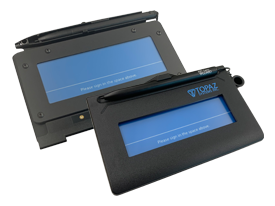
SigLite Standard Pads
Installation of Topaz Software
Step 1 – Install Browser Extension Software
Capture handwritten signatures for web applications running in the Chrome, Firefox, Edge, and Opera browsers. Supports remote usage.
Alternatively please download this file and install on the PC (No Mac supported) to register the application
Download and run this https://www.topazsystems.com/software/sigweb.exe package this will install the necessary files required
Step 1b – If additional settings needed we can run and configure other applications, please refer to product documentation
Step 2 – Once it’s installed then visit this link and test https://www.sigplusweb.com/sigwebtablet_demo.html if your topaz signature pad is showing the signature on this website. If this works then Topaz signature pad is recognized by your browser with the help of SDK/files required to accept the signature.
This is a good sign that we can test our eSignature plugin. If you continue to have issues then you will have to contact Topaz Support and request further help.
Step 3 – Close all browser and login to Acumatica instance, upload the custom package provided by InfoSourcing Inc and publish the package on the tenant/instance.
Once published access the eSignature configuration screen and click Activate button to paste the license key provided by the Customer success team.
Once the license key is plugged in you can test Acumatica Topaz Signature pages on Sales order or Shipment screen and see if the signature is accepted by clicking on “Sign and Done” buttons
Need Help or Looking for a Feature?
Please don’t hesitate to contact us here.
We’re always eager to help and are open to suggestions for new features.
